Spring XSD篇
标签: #Share
错误描述
有时候你会发现过去一直启动正常的系统,某天启动时会报出形如下面的错误:
org.xml.sax.SAXParseException: schema_reference.4: Failed to read schema document 'http://www.springframework.org/schema/beans/spring-beans-2.0.xsd', because 1) could not find the document; 2) the document could not be read; 3) the root element of the document is not <xsd:schema>.很显然,spring xml配置文件中指定的xsd文件读取不到了,原因多是因为断网或spring的官网暂时无法连接导致的。 你可以通过在浏览器输入xsd文件的URL,如:http://www.springframework.org/schema/beans/spring-beans-2.0.xsd 进行确认
XSD文件的作用
xml文档要有格式,为了Spring的配置文件增加的节点(比如<tx:advice)能符合要求、合法,必须通过引入校验该xml格式的文件,也就是xsd文件,Spring通过配置可以联网引入xsd文件,也可以在断网下使用本地xsd文件校验xml文件
xsi:schemaLocation 属性提供一种方法来查找在 XML 实例文档中定义的命名空间的 XML 架构定义。它的值是用空白分隔的统一资源标识符 (URI) 对的列表,其中的每一对 URI 都依次包含一个命名空间以及该命名空间的 XML 架构定义(通常为 .xsd 文件)的位置
```:link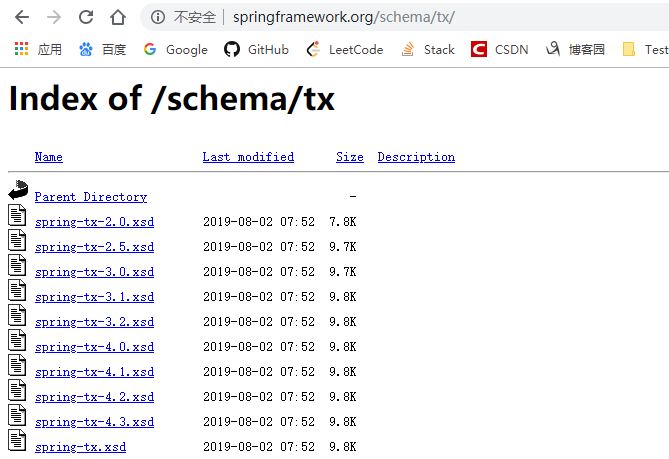 ## XSD引起的错误 > 前文讲到:XSD文件在Spring启动时起作用 > > - 项目正式启动时 > > - test测试时 > > - Maven打包不跳过test测试(不跳过test测试即会启动项目) > > > > Spring会默认从本地Jar中读取XSD文件,如果本地读取不到则会通过定义的url地址从网上进行下载 示例:  Spring中: 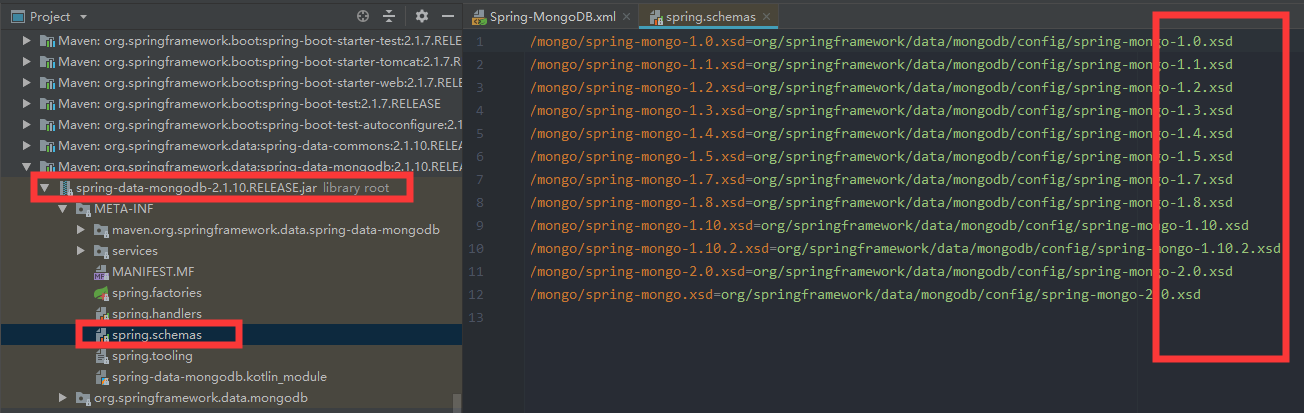 上述的版本无法对应,因此就会从网络读取,如果恰好服务器断网或没有外网,则项目启动后会在几秒钟之后停止,报关于解析xml文件错误 ```java java.lang.Throwable: org.springframework.beans.factory.xml.XmlBeanDefinitionStoreException: Line 1 in XML document from cn.testin.common.spring.pojo.DynamicResource@957e06 is invalid; nested exception is org.xml.sax.SAXParseException; lineNumber: 1; columnNumber: 1297; cvc-complex-type.2.4.c: The matching wildcard is strict, but no declaration can be found for element 'mongo:mongo-client'.
XSD引用解决方案
例子:

```xml
<?xml version="1.0" encoding="UTF-8"?>
<beans xmlns="http://www.springframework.org/schema/beans"
       xmlns:xsi="http://www.w3.org/2001/XMLSchema-instance"
       xmlns:context="http://www.springframework.org/schema/context"
       xmlns:aop="http://www.springframework.org/schema/aop"
       xsi:schemaLocation="http://www.springframework.org/schema/beans
       http://www.springframework.org/schema/beans/spring-beans.xsd
       http://www.springframework.org/schema/context
       http://www.springframework.org/schema/context/spring-context.xsd
       http://www.springframework.org/schema/aop
       http://www.springframework.org/schema/aop/spring-aop.xsd">
</beans>
其他方法:
思路一致,既然需要解决断网情况下无法启动的问题,则保证配置的能够生效即可
- 将tx的某个版本的xsd文件拷贝到工程的source folder下,然后xml的配置改成如下形式:
xsi:schemaLocation="http://www.springframework.org/schema/beans
        classpath:beans/spring-beans-4.1.xsd
        http://www.springframework.org/schema/mvc
        classpath:mvc/spring-mvc-4.1.xsd
        http://www.springframework.org/schema/context
        classpath:context/spring-context-4.1.xsd
        http://www.springframework.org/schema/aop
        classpath:aop/spring-aop-4.1.xsd
        http://www.springframework.org/schema/tx
classpath:tx/spring-tx-4.1.xsd ">- 根据使用的Spring的相应jar包版本更改对应的版本
本博客所有文章除特别声明外,均采用 CC BY-SA 4.0 协议 ,转载请注明出处!